Cloud Build

Microsoft Azure, 365 and all things Tech

Skip to content
  • About Me
  • Terms
  • Privacy

grant users permissions to add machines to the domain via group policy

How to allow Domain Users to add computers to the domain

Posted on December 5, 2020 by Imran Rashid
Reading Time: 4 minutes

In this blog post I will be going through:

1) How to grant delegate control to allow a user to add machines to the domain in a selected OU within Active Directory

2) How to grant users permissions to add machines to the domain via group policy (Default Domain Policy). This policy will allow permissions through your AD structure

3) How to prevent authenticated users from joining workstations to a domain (Disabling the default limit which allows users to add 10 machines to the domain)

By default, Windows domain users can join 10 machine accounts to the domain.

This default was implemented to prevent misuse, but can be overridden by an administrator by making a change to an object in Active Directory. I will go through the process of how to disable this feature later on in this blog post.

Note that users in the Administrators or Domain Administrators groups, and those users who have delegated permissions on containers in Active Directory to create and delete computer accounts, are not restricted by this limitation.

Enabling delegation rights is beneficial if you have a domain account which requires permissions to add mass machines to the domain but you don’t wish to grant the account domain admin rights. For example, in a Virtual Desktop solution like Windows Virtual Desktop where an account needs to be specified to add Virtual Session hosts to the domain automatically. We want to avoid adding an account with domain admin rights.

How to grant delegate control to add machines to the domain in a selected OU within Active Directory

1) Launch Active Directory

Note: I have already created a standard domain account within Active Directory named cloudbuild3. In this demo I will be allowing the account to create computer objects in my WVD Session Hosts OU. This is the OU where all my WVD Sessions hosts are deployed and are added to the domain in the process.

2) If not already done so, click view and enable advanced features


3) Right click your OU and click delegate control.

4) Click next

5) Click Add

6) Add the user/group you wish to allow, in my case I will be granting clouduser3 delegation control to be able to add WVD Session hosts in this OU to the domain. You could add also add a security group if your requirements are different

7) Click Create a custom task to delegate and click next

8) Click the options as show in the screenshot below and click next

9) Click Create All Child Object

10) Click Next and Finish

How to grant delegate rights to add machines to the domain via group policy (Default Domain Policy). Note, this policy will allow permissions through your AD structure if the Default Domain Policy has been allowed to apply.

1) Launch group policy
2) Right click default domain policy and click edit

3) Expand Computer Configuration > Policies > Windows Settings > Security Settings > User Rights Assignment and double click Add workstations to domain located in the right pane


4) Click Define these policy settings, click browse and locate your user/group. For the purpose of this demo I am selecting a user. Click Apply and OK when done
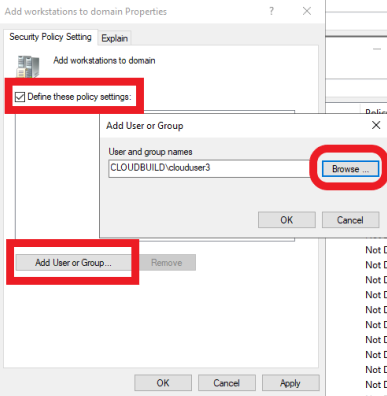

How to prevent authenticated users from joining workstations to a domain (Disabling the default limit to allow users to add 10 machines to the domain

As mentioned earlier in this blog post, by default, Windows domain users can join 10 machine accounts to the domain.

  1. Launch ADSI Edit or access via Start > Run > adsiedit.msc

2) Right click ADSI Edit and click connect to

3) Click ok, ensure Default naming context is selected if not already done so by default

4) Expand, right click on the domain folder and click properties

5) Scroll down and locate ms-DS-MachineAccountQuota

6) Click Edit and set the quota from 10 to 0, click OK and close

Posted in Active Directory Windows Virtual Desktop
Tagged configure WVD domain join account without domain admin permissions grant delegate control to add machines to the domains on an OU within Active Directory grant users permissions to add machines to the domain via group policy prevent authenticated users from joining workstations to a domain prevent domain users from adding machines to the domain stop users from adding machines to the domain
Leave a comment

Follow Me

  • LinkedIn
  • Bluesky
  • X
  • Meetup
  • GitHub
  • RSS Feed

Search

Subscribe

Keep up to date on the latest articles. We will never spam you or forward your details to third parties.

Name

Email


Recent Posts

  • Microsoft 365 Copilot tasks you can try in Outlook
  • Practical Microsoft 365 Copilot Tasks You Can Try in Excel
  • Extending Microsoft 365 Copilot with Microsoft Copilot Studio
  • Copilot Agents: Agent Builder, Copilot Studio, or Foundry?
  • Backups vs Replication vs High Availability vs Fault Tolerance vs Disaster Recovery
  • Building an Autonomous AI Agent in Copilot Studio – Part 9: Testing the Autonomous Agent
  • Building an Autonomous AI Agent in Copilot Studio – Part 8: Amend Existing Agent Instructions to Use Tools
  • Building an Autonomous AI Agent in Copilot Studio – Part 7: Add Tools to a Copilot Studio Agent
  • Building an Autonomous AI Agent in Copilot Studio – Part 6: Create a Trigger in Copilot Studio
  • Building an Autonomous AI Agent in Copilot Studio – Part 5: Create an Excel Log File to Record Mentor Requests
  • Building an Autonomous AI Agent in Copilot Studio – Part 4: Create an Excel Spreadsheet Listing Trainers and Qualified Courses
  • Building an Autonomous AI Agent in Copilot Studio – Part 3: Create a Copilot Studio Agent (Name, Image, Description, and Instructions)
  • Building an Autonomous AI Agent in Copilot Studio – Part 2: Create a Power Platform Environment
  • Building an Autonomous AI Agent in Copilot Studio – Part 1: Create a Microsoft Form
  • What are topics in Copilot Studio
  • Why You Should Register for Microsoft Certification Exams Using Your Personal Email and Not Your Work or School Account
  • Create a fingerprint based Sensitive Information Type (SIT) in Microsoft Purview – Part 10
  • Create a Sensitive Information Type (SIT) from scratch in Microsoft Purview – Part 9
  • Exploring a built-in Sensitive Info Type in Microsoft Purview – Part 8
  • Microsoft Purview Information Protection – Part 7
Azure Community Hero
Azure Learner
Cloud Champion
Top Azure Blogs

Certifications

  • azure-solutions-architect-expert-600×600
  • azure-security-engineer-associate600x600
  • azure-administrator-associate
  • NCDA-7-Mode_352x352
  • Designing+and+Deploying+Microsoft+Exchange+Server+2016-01
  • Microsoft_Exam533
  • Microsoft_Exam534
  • MCSA-Cloud-Platform-2018
  • azure-solutions-architect-expert-600×600
  • CERT-Associate-Microsoft365-Teams-Administrator
  • MS-100-exam
  • exam-ms100_1-600×600
  • microsoft365-enterprise-adminstrator-expert-600×600
  • microsoft365-messaging-administrator-associate-600×600
  • SCI_Challange_Complete_OpenHack_600X600
  • Microsoft Certified Trainer
  • MCT-2023-2024
  • azure-network-engineer-associate-600×600
  • sc-300
  • az-900
  • SC-900
  • AI-900
  • Microsoftaiskillsfestgwrattemptbadge[full]
Azure Crazy logo
BradCugLogo

RSS Feed

  • Twitter
  • linkedin

Cloud Build

© All rights reserved.

Powered by WordPress

Subscribe to new posts

Name

Email


Recent Posts

  • Microsoft 365 Copilot tasks you can try in Outlook
  • Practical Microsoft 365 Copilot Tasks You Can Try in Excel
  • Extending Microsoft 365 Copilot with Microsoft Copilot Studio

Archives

  • About Me
  • Contact Me
  • Microsoft Updates
  • Privacy
  • Terms

Subscribe

Subscribe to new tech posts.
We will never send you spam email or forward your details to third parties.


Name

Email


This will close in 0 seconds

error: Content is protected !!